
How It Works
Download
Install VisionClicker on Windows 10 or Windows 11.
Start Trial
The app requests your free 7-day trial automatically on first start.
Select Target
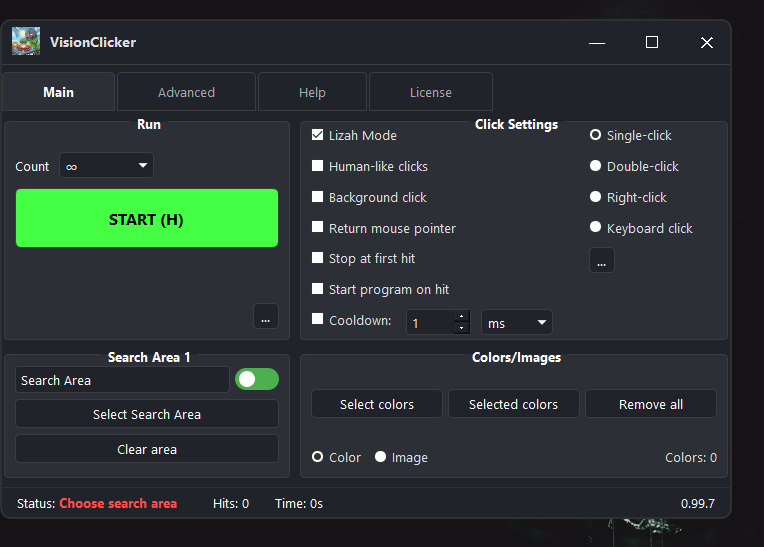
Choose a screen area and match by image or color.
Run
Use the hotkey to start or stop your automation instantly.
Built For Visual Automation
Standard auto clickers only click fixed positions. VisionClicker can react to what is visible on your screen, which makes it more useful when buttons, colors, or icons move.
Features
Image & Color Recognition
Doesn't click blindly. VisionClicker finds and interacts with specific images, icons, or colors on your screen.
Multi-Device License
Use your license on up to 3 devices simultaneously. An inactive device automatically frees up its slot after 10 days.
Easy Configuration
An intuitive interface makes it easy to set up your automation workflows without any coding.
High Performance
Optimized to be fast and resource-efficient, so it will not slow down your computer.
Workflow Automation
Useful for repetitive workflows, visual checks, game macros, and other screen-based tasks.
Save & Load Profiles
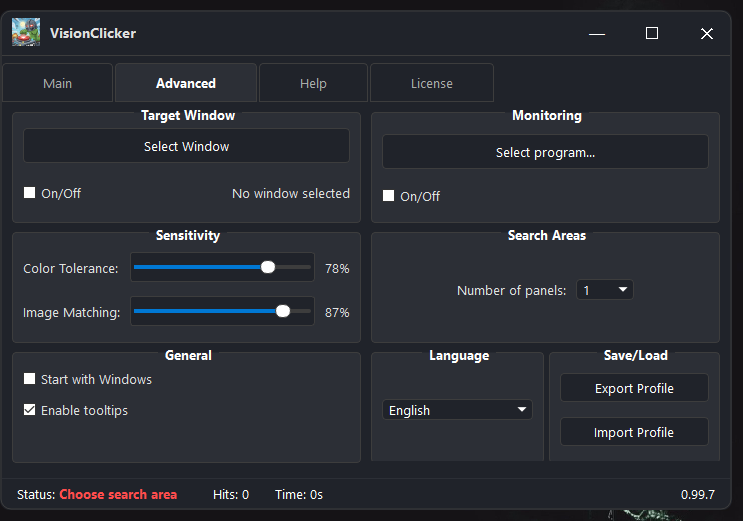
Create automation setups and save them as profiles. Switch between different tasks without reconfiguring everything.
Advanced Control
Customize click types, cooldowns, hotkeys, search areas, image matching, and color sensitivity.
Human-Like Click Variation
Add natural timing variation and click behavior so repeated actions feel less mechanical.
Windows Install Note
VisionClicker is made for Windows 10 and Windows 11. Because it is independent software, Windows SmartScreen may show an extra confirmation the first time you install it.
- Click More info.
- Click Run anyway.
Older Windows versions such as Windows 7 and Windows 8 are not supported.